omero-browser-qt
Reusable PyQt6 dialog for browsing and retrieving images from OMERO servers.
Features
- Login dialog with server-name history, automatic 10-minute session reuse, and runtime-only credential recall while the app remains open
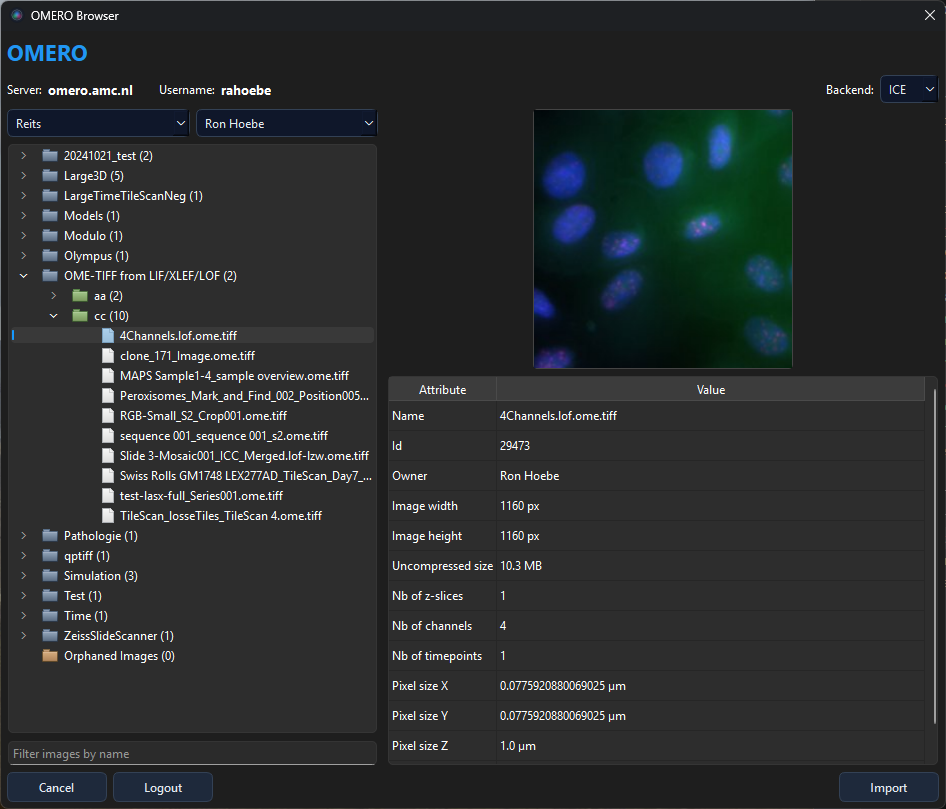
- QuPath-style browser — resizable dialog with group/owner filters, lazy-loading project → dataset → image tree, thumbnail preview, attribute table, and name filter
- ICE pixel loading — full 5-D array fetch or tile-based dask lazy loading for large / pyramidal images
- OMERO viewer — installable multi-channel viewer for slices, projections, playback, and channel-aware display settings
- 3D volume viewer — GPU-accelerated volume rendering with MIP, Attenuated MIP, Translucent, Average, Isosurface, Additive, and context-aware MinIP via vispy
- Embeddable — designed to drop into any PyQt6 application
30-second example
from PyQt6.QtWidgets import QApplication
from omero_browser_qt import OmeroGateway, OmeroBrowserDialog

app = QApplication([])
gw = OmeroGateway()

for img in OmeroBrowserDialog.select_images(gateway=gw):
    print(img.getName(), img.getId())

gw.disconnect()
Installation
pip install omero-browser-qt
!!! note “ZeroC ICE required”
omero-py depends on ZeroC ICE, which must be installed separately.
See Getting Started for detailed instructions.
What’s next?
| Section | Description |
|---|---|
| Getting Started | Prerequisites, install, first workflow |
| User Guide | In-depth usage of every component |
| API Reference | Auto-generated from docstrings |
| Examples | Recipes and the OMERO Viewer |