omero-browser-qt
Browser Dialog
The OmeroBrowserDialog is a QuPath-style resizable dialog for browsing
projects, datasets, and images on an OMERO server.
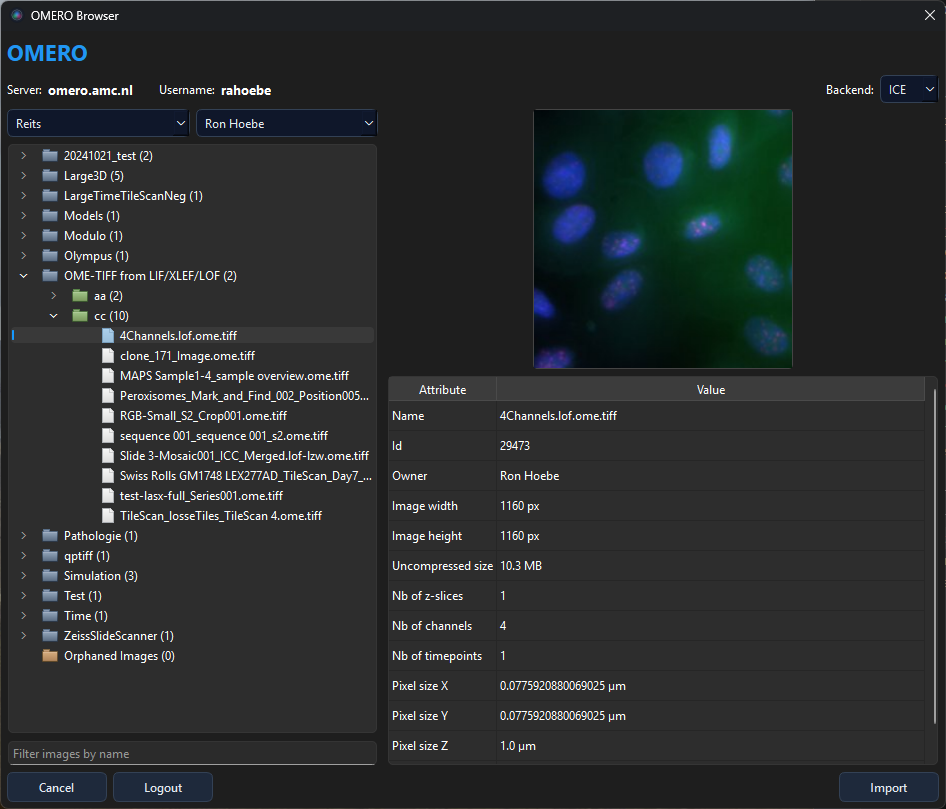
Layout
The dialog is divided into:
- Header bar — shows the connected server and username
- Left panel — group/owner filter combos, a lazy-loading project → dataset → image tree, and a name filter
- Right panel — 256 × 256 thumbnail preview and an attribute table (dimensions, pixel sizes, acquisition date, …)
- Footer — Import button to confirm the selection
Login and session reuse
When the browser is opened through the convenience APIs or from the viewer, the app first tries to restore a recently cached OMERO session. If that fails, the login dialog is shown.
The login dialog supports:
- Server history via
QSettings - Automatic 10-minute session reuse to reconnect across app restarts while the OMERO session remains valid
- Runtime-only username/password recall while the app remains open
The password itself is not persisted to disk.
Quick selection API
The simplest way to use the dialog is via the class-level convenience methods. These handle login, browsing, and returning selected images in one call:
from omero_browser_qt import OmeroBrowserDialog

# Returns a list of OMERO ImageWrapper objects
images = OmeroBrowserDialog.select_images()

# Returns SelectedImageContext objects with breadcrumb info
contexts = OmeroBrowserDialog.select_image_contexts()
Both methods accept an optional gateway argument. If omitted, a new
OmeroGateway singleton is created automatically.
Lower-level API
For full control over dialog lifetime:
from omero_browser_qt import OmeroGateway, LoginDialog, OmeroBrowserDialog

gw = OmeroGateway()
if LoginDialog(gateway=gw).exec():
    dlg = OmeroBrowserDialog(gateway=gw)
    if dlg.exec():
        images = dlg.get_selected_images()
Multi-selection
Hold Ctrl (or Cmd on macOS) to select multiple images in the tree.
All selected images are returned by get_selected_images().
Filtering
Type in the Filter field at the bottom of the tree panel to filter images by name. The filter applies to the currently expanded datasets.
Selection context backend
SelectedImageContext.backend is retained for compatibility and always
returns "ICE".